
The volume, cold and hot icon lights on my Sterra 7 Tankless Water Purifier are blinkingUpdated 3 months ago
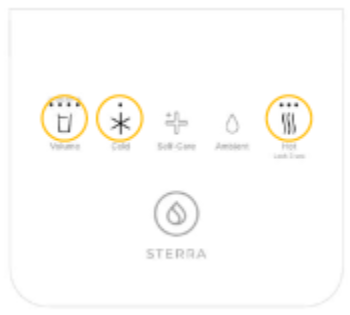
If your machine is showing this error, it means the internal temperature is too high.
The machine’s safety sensor has detected 60°C or above. When this happens, the unit will temporarily stop operating to protect its internal components.
This is a built in safety feature.
Please follow the steps below.
Step 1: Switch off the machine
Turn off the machine using the main power switch.
Unplug it from the power source.
Step 2: Clean the dust filter
The dust filter is located at the back of the machine.
Remove the filter.
Wash it under running water.
Make sure all dust is removed.
Let it dry completely before placing it back.
Step 3: Check ventilation space
Please ensure:
• There is at least 15 to 20 cm of space around the machine.
• The ventilation slots are not blocked.
• The machine is not placed near heat producing appliances.
Proper airflow helps prevent overheating.
Step 4: Allow the machine to cool down
Leave the machine switched off for about 2 hours to cool down fully.
Step 5: Turn the machine back on
After 2 hours:
Plug the machine back in.
Switch it on.
The machine will begin auto flushing.
You will see the dispense button enter breathing mode.
• Wait about 15 minutes.
• All lights will turn off once flushing is completed.
This is normal.
If the issue continues
If the high temperature issue appears again after trying the steps above, please email us at [email protected] with:
• Your order number
• A short video showing the error