
Both the ambient and volume icon lights on my Sterra 7 Tankless Water Purifier are blinkingUpdated 3 months ago
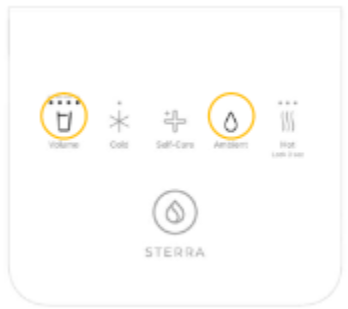
If your machine is showing an error, this usually means there may be a loose internal connection. In most cases, this is related to a wire connection inside the unit. Do not worry, we will guide you through a few quick checks first.
Step 1: When was your unit installed?
Was your water dispenser installed within the last 15 days?
If yes, please let us know when contacting support.
Step 2: When did the issue start?
Did this happen recently?
If the issue just started, please try a simple restart:
Switch off the machine at the main power source.
Unplug it.
Wait for 5 to 10 minutes.
Plug it back in and switch it on.
Step 3: Wait for auto flushing
After restarting, the machine will begin auto flushing.
You will see a breathing light on the dispense button.
• Wait about 15 minutes.
• All lights will turn off once flushing is completed.
This is normal.
Step 4: Check for power trips
Did your house experience any recent power trip?
If yes, the restart above may help stabilise the unit.
Step 5: Check for water leakage
Please check the bottom of the machine.
Do you see any water leaking?
• If yes, please stop using the machine and contact us immediately.
• If no, continue to monitor after the restart.
When to Contact Us
If the error continues after trying the steps above, please email us at [email protected] with:
• Your order number
• A short video of the display showing the error